The May 2026 Workday Wire highlights upcoming UX changes to Workday’s homepage, search, and navigation this summer, along with several process updates, seasonal reminders, and new support resources for users.
Coming This Summer: Enhancements to Homepage, Search, and Navigation
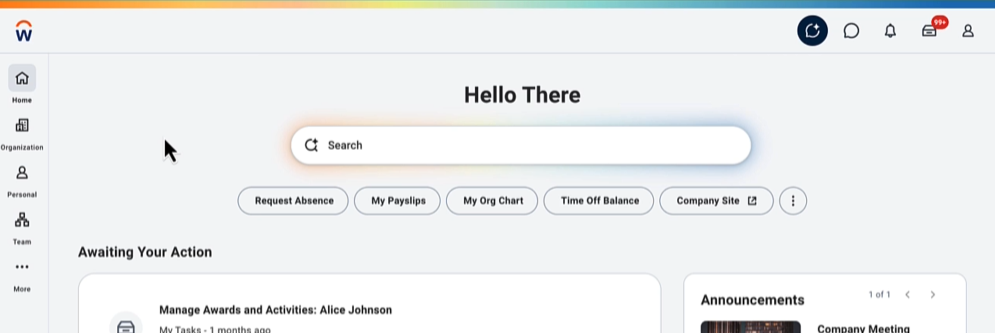
Workday’s platform is always evolving to enhance the user experience. This summer, we’re updating Workday with a new, modern look.
What’s changing:
- Workday Home Page: With these changes, you will see a refreshed home page and a cleaner, modern page layout.
- Workday Search: The search bar and search results will look a little different and feel more intuitive. Search will better understand natural language, making it easier to find tasks and information.
- Navigation: A revamped sidebar navigation will make it easier to quickly scan and access key pages with less clicks.
- Change Job: New templates and design updates streamline the Change Job business process.
What’s not changing:
- How you complete your core tasks in Workday (like requesting time off, viewing pay, and approving items) remains the same.
- Your access, security, and permissions aren't changing.
These updates will roll out to all users later this summer. We will notify users in advance of deploying the changes.
Behind the Scenes: Making Workday Resources Easier to Find and Use
We know that a big part of making Workday easier to use every day is having the right resources available at your fingertips. While there are many ways to get to our resources, we want to highlight two areas where we are working to enhance ease of access and search for our materials:
Employee Service Center (support.umd.edu)
How does it work?
This website is where all of our resources live. You can find our resources on this website through the search feature.
How is it improving?
Our team is working to improve the findability of these resources by looking at the phrases or words users are searching the most, and ensuring that these keywords lead our users to the right resources.
Workday Virtual Agent
How does it work?
The Workday Virtual Agent is a chatbot that can answer your questions about Workday around the clock, 24/7. The Agent provides answers from our large collection of job aids, workflows, quick start guides, knowledge articles, and the ERP website.
How is it improving?
- Any time we make an update, those changes are reflected in the answers provided by the Workday Virtual Agent.
- This week, we upgraded the chatbot to a new model that answers questions more intelligently.
- Users can provide Thumbs Down feedback to any answers that are incorrect or not helpful. We take each piece of feedback and members of our team provide guidance, better information, or new material to enable the Agent to provide better answers moving forward.
- Beginning June 11, the Workday Virtual Agent will be placed behind a CAS login. This will enhance the security of our materials while also enabling us to link to the Workday Virtual Agent in more prominent places across our websites.
Updates and Reminders
Prepping for Summer: Time Off Requests, Approvals, and Delegations
Managers, be sure to stay on top of reviewing and approving employee time-off requests, especially ahead of the busy summer season, to ensure accurate staffing, payroll, and operations. Additionally, remember to prepare for your own time off by setting up delegations.
New PFML Program Coming July 1, 2026
Beginning July 1, 2026, USM will implement a new Paid Family and Medical Leave (PFML) program. We are working with UHR to develop resources to inform the community - stay tuned!
PRD Expectation Setting is Open
Expectation Settings opened on Monday, May 11, and must be completed by Tuesday, June 30.
(Late) Spring Cleaning in Workday
Now is a great time to reduce noise and clean up some items in Workday. You can:
- Review and clean up tasks in your Inbox
- Review and end old jobs (i.e. summer 2025 jobs, or jobs ended <30 days)
- Use RPT1259 to identify the summer jobs/ period activity pay
- Use RPT019 to identify jobs that have an employment end date in the past
Business Process Update: Change Job
There is a business process update in the Change Job business process. Effective May 4, 2026, the costing allocation task in the Change job business process has been removed.
Updates to Creating Receipts in Workday
As of this week (5/26/2026), department users will no longer have the ability to Create a Receipt Adjustment in Workday.
Enhancement to 'Create Request' Task
We’ve made an update to several Workday Create Request types to improve how requests are labeled and searched.
Resource Roundup
New and Updated Resources:
- *NEW* Monitoring Payroll Quick Start Guide
- Assign Costing Allocation Job Aid
- Change Job Workflow
- Create a Receipt
Talk to a Person: Visit a Virtual Office Hour
While we have many resources available as well as the Workday Virtual Agent which can provide answers 24/7, we know that sometimes you need to connect with a person to help with your issue. You can attend one of the many Virtual Office Hours available to connect with members of the Central Business Units and ERP Services.
Did you know?
You can use the Workday Virtual Agent to find job aids, workflows, or quick start guides. The Agent is often better at reading plain language than some standard search engines, and might provide better results. For example, you can ask: Can you show me any resources a HR Analyst might need for the Change Job process?