The Division of IT is committed to ensuring that our products and services are accessible and usable by all community members, including Workday. Workday evaluates their system against the international standard Web Content Accessibility Guidelines (WCAG) version 2.2, Levels A and AA. This is in line with the University of Maryland Accessible Technology Policy.
Some of the benefits of the Workday platform with regards to accessibility include:
Screen reader compatibility
Workday is designed to be accessible by users who use screen readers assistive technology.
Keyboard support
Keyboard shortcuts and functionalities make Workday navigable for non-mouse users.

Color contrast
Workday assists people with varying vision disabilities by considering use of color and contrast its user interface.
Accessibility Interaction Guide
For more information on accessibility in Workday, including information on navigating Workday using assistive technologies such as screen readers and keyboards, please view the Accessibility Interaction Overview in Workday itself. You can also bookmark this page for future reference.
Accessibility Assistance
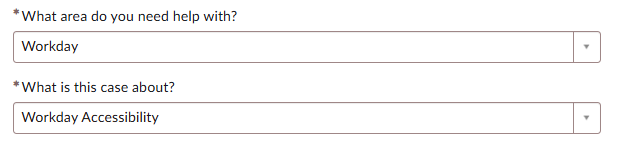
Have a question or need assistance with accessibility in Workday? We are here to help. Please open a case with our team and select “Workday Accessibility” as seen below.